


Arbiter
4.1444.00 Reviews
App Specs
- Version
- 1.15.0
- Updated On
- License
- Free
- Downloads
- 100,000+
- Developer
- ArbiterSports
- Categories
- Sports
- Platform
- Android
Screenshots
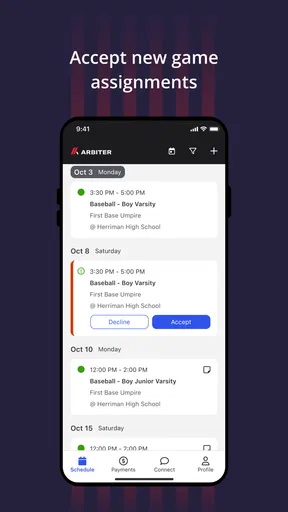
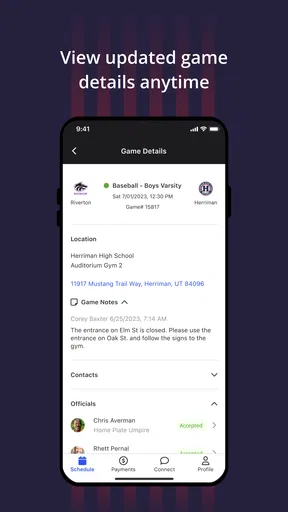
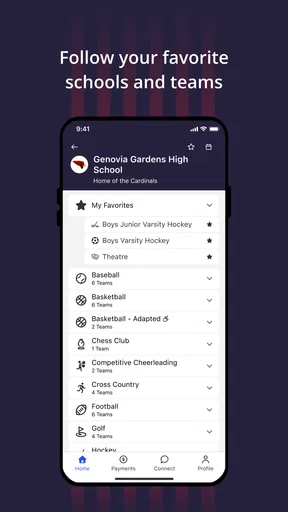
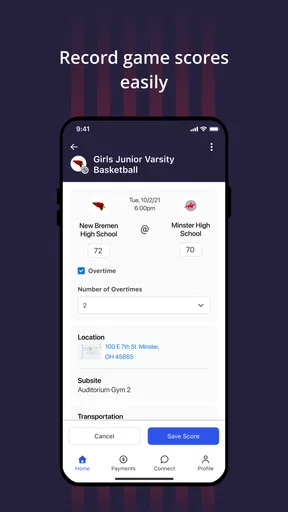
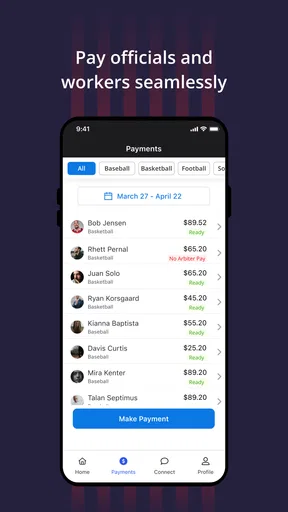
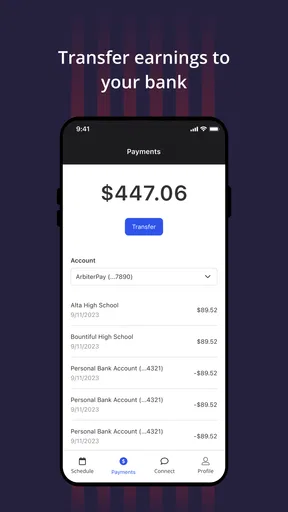
 Analysis by AppCompare
Choosing whether to try a sports app depends less on its store category than on the job you need it to do. Arbiter is made by ArbiterSports, and the key question for me is whether you need a tool connected to organized sports activity or simply a general-purpose way to settle everyday choices. Those are very different needs, even if the name might initially suggest something broader.
Before installing it, I’d check how it fits the way your team, league, or sports organization already handles its work. An app is most useful when the people you need to coordinate with use the same system; it is less helpful when you are looking for an all-purpose sports news feed, workout tracker, or casual game. That distinction matters more than a polished first impression.
Start with the job you want it to do
I’d approach this as a practical decision rather than an impulse download: are you using it in connection with organized sports, or do you want something for personal fitness, following scores, or entertainment? The first kind of need is where a sports-administration app may make sense. For the others, a dedicated training, live-score, or news app is usually a more direct fit.
That also makes this a better choice for people who have a reason to be involved in the ArbiterSports environment than for someone browsing the sports category at random. If you are a participant, family member, or organizer, first check whether your group expects you to use it and which tasks you are expected to complete there. That small step can prevent the common frustration of installing an app before knowing whether it applies to your situation.
Where it can earn a place in a sports routine
My strongest case for using it is when it belongs to an existing sports workflow. For example, imagine a busy weekend with a family member participating in organized sports: you may need to check the relevant information before heading out, then keep the app available for follow-up. In that situation, a dedicated service can be more convenient than searching old messages, email threads, and general web pages for the latest instructions.
A useful habit is to check the app before the day gets hectic, rather than waiting until you are already travelling or standing at a venue. I’d also make sure the account and any relevant event details are in order while I have time to resolve a sign-in or setup issue. These are simple steps, but they matter more in a coordination tool than they do in a casual game, where a delay usually costs nothing.
It is also worth thinking about who needs to act on the information. If only one person in a household or team uses the service, they may end up relaying details to everyone else. If several people need access, it is sensible to agree in advance on who checks for updates and who handles any required follow-through. That avoids assuming that installing the app automatically keeps the whole group coordinated.
Worth Reading Before You Choose

Flipboard Shows What News Apps Must Do Beyond the Feed

Switching to Android Auto Means Rethinking Your Driving Routine

Google Calendar Makes a Crowded Week Easier to Manage

Ludo King Makes the Most of the Minutes Between Plans

Baby Panda World Brings Quick Play to Modern Phones, but Its Game Library Feels Busy

ESPN’s Live Game View Makes Following Close Games Easier
When another kind of sports app is better
There are plenty of legitimate reasons to skip it. If you mainly want training plans, exercise tracking, or personal performance records, a fitness-focused app is likely to be a better match. If your priority is following a professional team, scores and sports reporting are more directly served by live-score or news apps. And if you are simply looking for a way to organize a pickup game with friends, a group chat or calendar may be enough.
Compared with those alternatives, the value of a sports-specific service is its fit with a particular organized-sports process, not the number of general features it can replace. I would not expect it to act as a universal hub for every part of an athlete’s life. The trade-off is straightforward: a focused tool can reduce friction for the task it supports, but it may feel unnecessary if your sports activity is informal or your organization uses another channel.
What to check before switching
If you are moving from messages, email, or another system, don’t delete your old routine immediately. First confirm that the people who send you important information are using the same channel and that you can access what you need. During the changeover, keeping an eye on both places can prevent missed details, though it is worth setting a point at which you stop checking the old method so the overlap does not become permanent.
I’d also treat notifications as something to configure thoughtfully if the app offers relevant controls on your device. Too many alerts can make people ignore them; too few can leave them checking manually. A practical middle ground is to allow the alerts that affect an upcoming responsibility while keeping unrelated phone notifications under control. This is a general device-setting tip, not a claim about a particular Arbiter feature.
Questions about access are best answered before the first time-sensitive task: does your organization expect you to create an account, who can help if you cannot sign in, and what should you do if your information looks out of date? Asking the organizer or the person who directed you to the app is often quicker than guessing. It also helps distinguish an app problem from a missing or incorrect detail in the underlying sports process.
The app is free, which makes trying it less of a financial commitment, but free does not automatically mean useful for every sports fan. I’d judge it by whether it replaces a real point of confusion in your own routine. Its Everyone age rating makes it broadly suitable from a content perspective, but younger users may still need help with account setup or with understanding what information they are expected to check.
How I’d decide whether to keep it
After installing any organizational app, I give it a fair test against one real task rather than judging it by its icon or first screen. Can I get to the information I need? Does it fit the process my group actually follows? Do I know where to turn if something is missing? If the answer to those practical questions is yes, it has a reason to stay on my phone. If not, I would ask whether the issue is setup, the organization’s workflow, or simply a mismatch between the app and my needs.
That approach is especially helpful for people who are not the primary organizer. A participant or parent may only need occasional access, while a person coordinating activities may rely on the app more often. Their experiences can differ, so I would not assume that one person’s limited use means the tool is pointless for the whole group—or that an organizer’s enthusiasm means every family member needs to install it.
For a new user, I’d also keep expectations modest. A specialist sports app can make a defined process easier to follow, but it cannot make an organization’s instructions clearer or guarantee that everyone communicates consistently. If something important is unclear, confirm it with the responsible person rather than relying on assumptions or treating the app as a substitute for direct communication.
The current release is version 1.13.0, and the app first appeared on July 19, 2021. Its average rating is 4.4 from around 660 ratings, with more than 400 written reviews and over 100,000 installs. I see those figures as signs that people have used and assessed it, not as proof that it will suit every league or every role; your own organization’s use is still the most relevant test.
My take on Arbiter
If you've ever found yourself tangled in decision-making, Arbiter might just be the app to streamline your life. I recently took it for a spin, and let me tell you, it’s like having a wise friend right in your pocket. Let's dive into what makes this app tick and whether it’s worth your precious storage space.
What is Arbiter?
Arbiter is an app designed to help you make decisions with ease. Whether you're deciding what to eat for dinner or which movie to watch, this app promises to simplify your choices. It's like having a personal decision consultant, minus the hefty fees. The app is available for both Android and iOS, making it accessible to almost everyone with a smartphone.
Setup and User Interface
Getting started with Arbiter is a breeze. The download and installation process is quick, and once you're in, you're greeted with a sleek and intuitive interface. The design is minimalistic but functional, which I appreciate. You won't find any unnecessary clutter here; it’s all about getting you to your decision efficiently.
Features That Stand Out
One of the standout features is the decision wheel. You input your options, give it a spin, and let fate decide. It’s surprisingly fun and takes the pressure off making a choice. The app also offers polling options, where you can share your dilemmas with friends or family to get their input. This is perfect for those times when you want a second opinion.
If you’re someone who loves data, the app also provides insightful analytics on your decision patterns. It’s fascinating to see how often you lean towards certain types of choices. The app even offers suggestions based on your preferences, learning from your past decisions.
Performance and Reliability
During my testing, the app performed flawlessly. No crashes or bugs to report, which is always a plus. The developers clearly put a lot of effort into ensuring a smooth user experience. It’s also worth noting that the app doesn’t drain your battery or gobble up data, making it a reliable companion for your daily decision-making needs.
Privacy and Security
In today’s digital age, privacy is a big deal, and Arbiter respects that. The app doesn’t require any intrusive permissions, and your data stays on your device unless you choose to share it. This level of privacy is a massive relief, especially for those of us who are cautious about our digital footprint.
Who Will Love Arbiter?
If you're indecisive or just love a bit of gamified decision-making, this app is for you. It's perfect for anyone who finds themselves overwhelmed by choices. From students deciding on study schedules to professionals juggling project priorities, Arbiter offers a fun and effective solution.
In conclusion, Arbiter might not be a life-changer, but it certainly makes everyday decisions more enjoyable. Whether you’re looking for a bit of fun or genuinely need help making choices, this app is worth checking out. So, if you're tired of the "what should I do" game, give Arbiter a whirl. You might just find yourself wondering how you ever lived without it.
Pros
- User-friendly interface enhances navigation.
- Real-time updates keep information current.
- Customizable settings for personalized use.
- Seamless integration with other apps.
- Efficient performance with minimal lag.
Cons
- Limited offline functionality restricts use.
- Occasional ads interrupt user experience.
- Subscription required for premium features.
- Compatibility issues with older devices.
- Some features have a steep learning curve.
FAQs for Arbiter
What is Arbiter and what does it do?
Arbiter is a versatile app designed for managing and organizing tasks, schedules, and projects efficiently. It offers features like task prioritization, deadline reminders, and collaboration tools. Whether for personal use or team projects, Arbiter facilitates streamlined workflow management and enhances productivity by keeping everything in one easily accessible place.
Is Arbiter available on both Android and iOS platforms?
Yes, Arbiter is available for download on both Android and iOS platforms. Users can find the app on Google Play Store for Android devices and on the Apple App Store for iOS devices. This cross-platform availability ensures that users can access their tasks and projects seamlessly across different devices.
Does Arbiter support team collaboration?
Absolutely, Arbiter is designed with collaboration in mind. It allows users to share tasks and projects with team members, assign responsibilities, and track progress in real-time. The app’s collaboration tools make it easy for teams to stay connected, communicate effectively, and achieve their goals more efficiently.
Is there a cost associated with using Arbiter?
Arbiter offers a free version with basic features suitable for individual users. However, for more advanced features like extended storage, premium support, and enhanced collaboration tools, there is a subscription-based model. Pricing details can be found within the app or on the official Arbiter website.
How secure is my data on Arbiter?
Arbiter prioritizes user security and employs advanced encryption protocols to ensure that your data is safe. Regular updates and security patches are implemented to protect against vulnerabilities. Additionally, users have the option to enable two-factor authentication for an added layer of security.


